Workforce Management Made Simple
Track attendance, manage shifts, approve leave requests and organize your entire workforce from one central platform.
The problem
Stop Managing Your Workforce Manually
i-clock helps companies replace spreadsheets, manual attendance records and fragmented workforce processes with one connected platform.
Manual attendance tracking
Paper lists and spreadsheets make working hours impossible to verify.
Complicated shift planning
Building rosters by hand costs hours every single week.
Slow leave approvals
Requests get lost between email, chat and printed forms.
Inaccurate working hour reports
Manual calculations lead to payroll errors and disputes.
Disconnected employee information
Employee data lives in different tools with no single source of truth.
Time-consuming Excel exports
Every report means rebuilding the same sheet from scratch.
Platform features
Everything Your Workforce Needs
One platform for people, hours, shifts and reporting — designed for teams that need clarity every day.
Employee Management
Manage employee profiles, departments, roles and employment information from one place.
Time and Attendance
Track working hours, check-ins and check-outs with optional GPS geofencing, late arrivals and attendance records.
Shift Planning
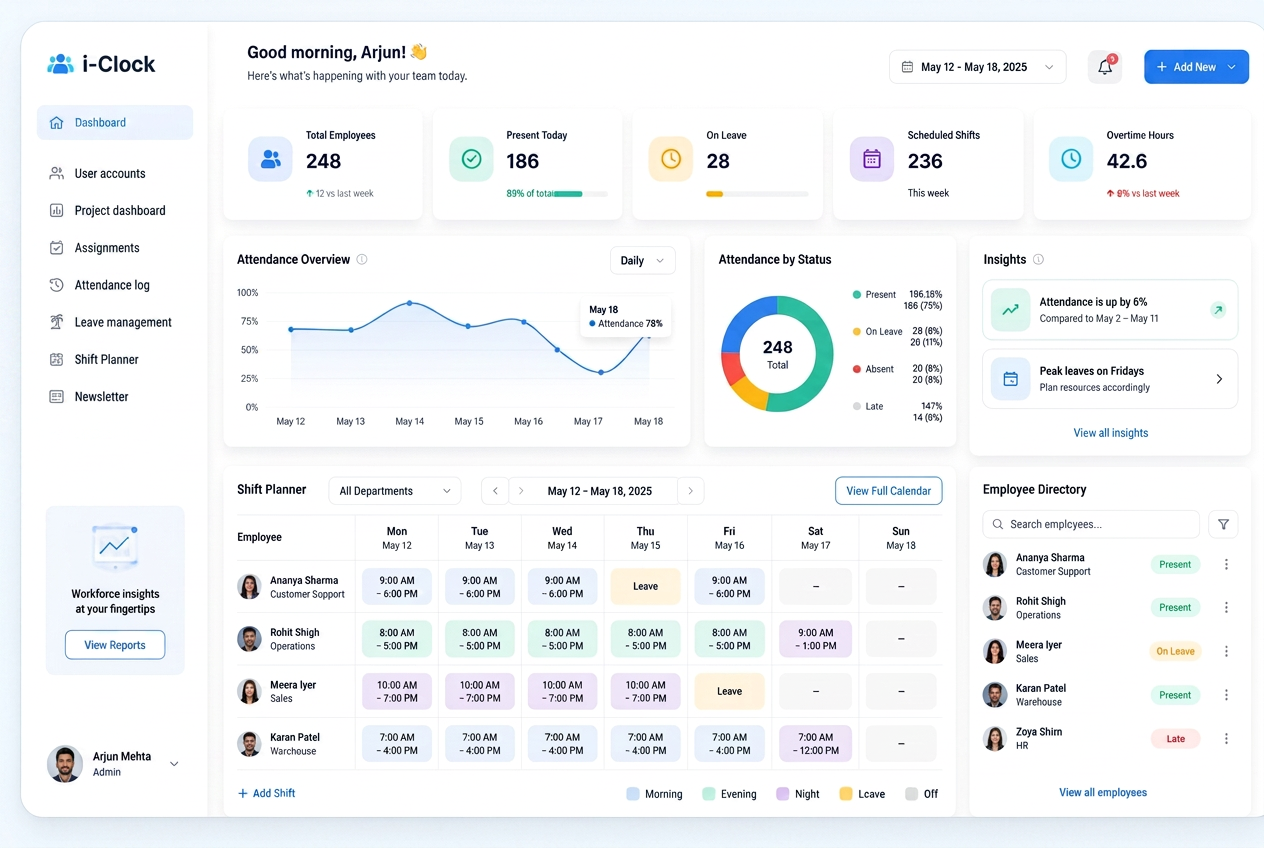
Create, assign and manage employee shifts through a visual shift planner.
Leave Management
Leave requests with approvals, medical certificate uploads and printable official request forms.
Public Holidays
Configure and manage company and regional public holidays.
Teams and Departments
Organize employees into teams, departments and operational groups.
Workforce Calendar
View shifts, leave requests, holidays and workforce events in one shared calendar.
Reports and Exports
Generate and export workforce, attendance and working-hour reports.
Workforce Analytics
View important statistics, employee activity and attendance data through visual dashboards.
Role-Based Access
Provide different access levels for administrators, managers and employees.
New in i-clock
Latest Platform Capabilities
Payroll, location-verified clock-ins, self-service shift swaps, call center planning tools and advanced leave handling — now part of i-clock.
Payroll & Payslips
- Automatic gross/net salary calculation based on worked hours, tax deductions and pension contributions.
- Overtime, night-work and weekend supplements in line with labour law.
- Detailed, printable and downloadable payslips — accessible to employees and the admin panel.
GPS Geofencing for Clock-in & Out
- Location verification with a geographic radius (geofence).
- Clock-ins and clock-outs are only accepted from the office or an authorized work site.
Shift Swapping
- Self-service for agents and employees to request and swap shifts with each other.
- Supervisor approval workflow with automatic notifications.
Call Center & WFM Tools
- Built-in Erlang C calculator to forecast agent requirements from call volume and service level.
- Shift calculator to optimize shift coverage.
Advanced Leave Management
- Upload medical certificates and supporting documents for sick leave.
- Generate and print official leave request forms.
- Per-employee leave-only mode or time-tracking toggle.
Getting started
How It Works
Three steps from spreadsheets to a fully organized workforce.
- 01
Step 1: Create Your Company Account
Set up your organization and company information.
- 02
Step 2: Add Employees and Schedules
Create employee accounts, teams, departments and working schedules.
- 03
Step 3: Manage Your Workforce
Track attendance, approve leave, plan shifts and generate reports.
Who it is for
Who It Is For
Teams that depend on accurate hours, shifts and availability.
- Call Centers
- Small and Medium Businesses
- Customer Support Teams
- Service Companies
- Remote and Hybrid Teams
- Multi-Department Organizations
Pricing
Simple Pricing Based on Team Size
Choose the plan that matches your number of employees.
Annual billing includes a 15% discount.
Core
1–20 users
All core modules for small teams getting organized.
€5.00/ user / month
20 users = €100 / month
- All core modules
- Employee management
- Attendance tracking
- Leave management
- Email support
- Most Popular
Growth
21–50 users
Core modules plus reporting and notifications.
€4.50/ user / month
50 users = €225 / month
- Everything in Core
- Advanced reports
- Notifications
- Shift planning
- Shift swapping with approvals
- GPS geofencing clock-in
- Priority support
Professional
51–100 users
Professional features for multi-department organizations.
€4.00/ user / month
100 users = €400 / month
- Everything in Growth
- Professional features
- Workforce analytics
- Payroll & payslips
- Erlang C & shift calculator
- Advanced exports
- Role-based access
Enterprise
101+ users
Enterprise package tailored to your organization.
Custom pricing
Based on requirements
- Enterprise package
- Priority support
- Custom onboarding
- Custom features and integrations
Cost estimate
Employee Pricing Calculator
Enter your team size to see the recommended plan and your estimated cost.
Recommended plan
Core
1–20 users
- Estimated monthly price
- €90
- Estimated annual price
- €1,080.00
- Annual savings
- €0.00
Product tour
See i-clock in Action
A closer look at the modules your team will use every day.
Security & trust
Workforce Data, Handled Carefully
Employee information is sensitive. i-clock is built with access control and secure infrastructure at its core.
Secure user authentication
Every account is protected by a secure sign-in process.
Role-based permissions
Administrators, managers and employees see only what they need.
Controlled access to employee information
Sensitive employee records stay limited to authorized roles.
Secure cloud infrastructure
Hosted on managed cloud infrastructure with encrypted connections.
Regular backups
Your workforce data is backed up on a regular schedule.
Privacy-focused data handling
We collect only what the platform needs to operate.
FAQ
Frequently Asked Questions
Everything teams usually ask before getting started.
Talk to us
Request a Demo
Tell us about your team and we will show you how i-clock fits your workflow.
Ready to Simplify Workforce Management?
Start organizing your employees, working hours, shifts and leave requests from one central platform.